For schools

Your school trips, organised in one place.

One shared sheet per trip, with chaperones, transport and payments. Each person in charge updates their part and you see what's missing, without asking anyone.

9 months free to try it at your school. Then €150 a year per school.

Sample trip

Visit to the Science Museum

Year 10 (4.º ESO) A and B · 50 pupils

What's left to sort out

Chaperones
2 assigned · Done
Transport
awaiting confirmation · Pending
Canteen
notified · Done
Deposit
€350 recorded as paid · Done
Balance
€800 outstanding · Pending

The problem

To find out how a trip is going, who do you have to ask?

  • Is the transport confirmed?
  • Who is going with the groups?
  • Has the deposit been paid?

The answer shouldn't depend on finding the right person. In Edvium it's on the trip sheet.

How it works

One trip. Everyone does their part.

Each person in charge updates their own part. The rest of the team can follow progress, according to their permissions.

Sample trip: Visit to the Science Museum

  1. Teachers

    Plan the trip.

    They add classes, date, place and chaperones. The information is there to organise the trip.

    Classes: Year 10 A and BChaperones: 2 assigned
  2. School services

    Update the logistics.

    They update the transport, the chaperones and the note to the canteen. You can see what's ready and what's missing.

    Transport: awaiting confirmationCanteen: notified
  3. Accounts

    Review the finances.

    They record deposits and payments. You can see what has been paid and what is outstanding.

    Deposit: €350 recorded as paidBalance: €800 outstanding

The head's office can review the whole picture without asking about each trip person by person.

Tracking

At a glance, you see where to step in.

See which trips need attention and open their sheet to check what's outstanding.

Sample statuses

  • Science Museum

    Transport: pendingFinances: pending
  • Farm visit

    Transport: doneFinances: done

Check the state of the finances and the detail of each payment on every trip's sheet.

See the app

See how a trip is organised in Edvium.

App screens with sample data: trip details, chaperones, logistics and payments.

Demo with sample data
  • Edvium screen for creating an activity: Visit to the Science Museum, classes 4.º ESO A and B, date and times, with sample data (screen in Spanish).
    Trip details: name, classes, date and times.
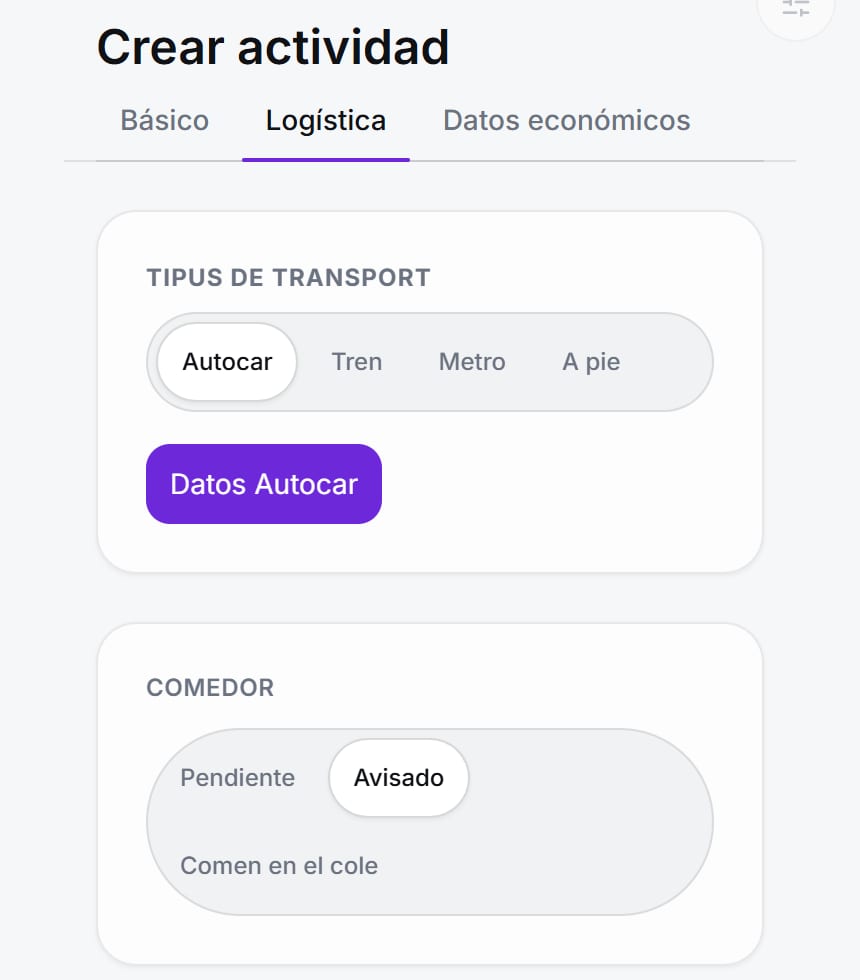
  • The activity's logistics section with the transport type and the note to the canteen, with sample data (screen in Spanish).
    Logistics: transport and the note to the canteen.
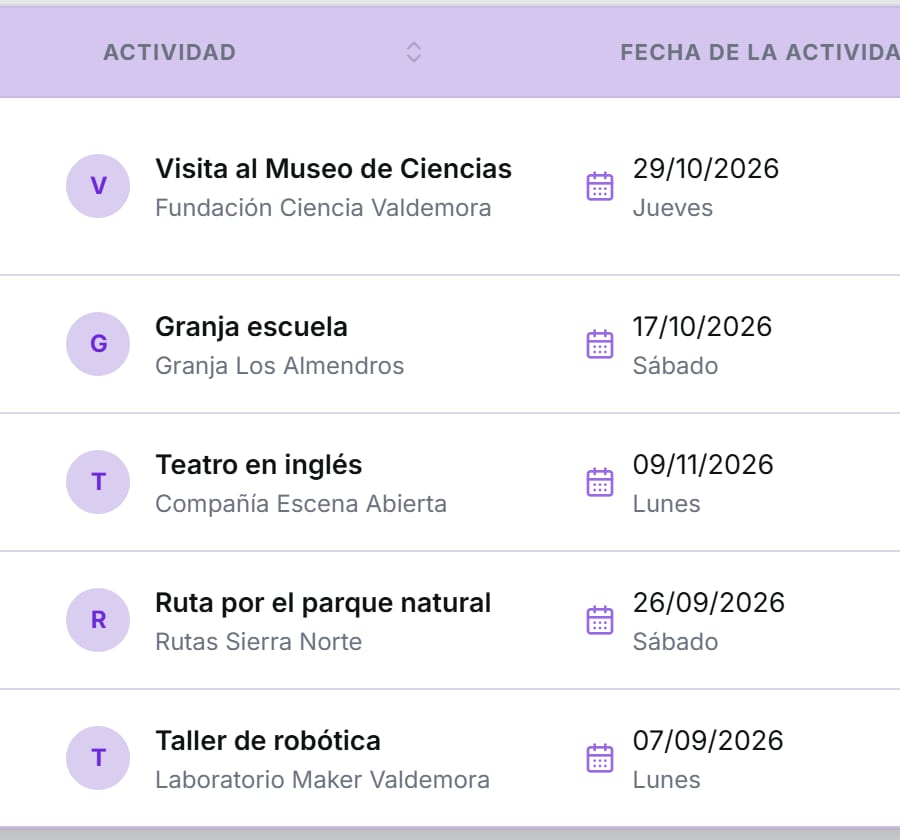
  • List of the school's activities with name, place and date, with sample data (screen in Spanish).
    The school's list of trips.

Control and tracking

Check changes, control access and share the information.

One trip, with its history, its permissions and its reports.

Sample trip

Science Museum

Year 10 (4.º ESO) A and B · 50 pupils

Chaperones
2 assignedDone
Transport
awaiting confirmationPending
Finances
pendingPending

Change history

  1. School services · Canteen notifiedToday · 16:24
  2. Teacher · Chaperones updatedYesterday · 09:17
  • Change history

    If a detail changes, you can see who changed it, when and what changed.

  • Permission-based access

    Decide what each user can see and edit.

  • Exportable information

    Take the list into Excel or print a trip's sheet when you need to share it outside Edvium.

  • Payments and reports linked to trips

    Import your accounting entries and link them to each trip. You can also export staff attendance.

See the app

Pricing

One price per school.

Try Edvium with your school's trips for 9 months free. Then €150 a year per school.

To start:

9 months free

Then:

€150 a year per school

Start the 9 free months

The 9 free months start when you create your school's account.

FAQ

Before you start.

  • Who takes part in Edvium?

    Teachers, school services, accounts and the head's office can take part, with the access and permissions set for each user.

  • Does everyone see and edit the same things?

    No. The information and actions available depend on the permissions and responsibilities assigned.

  • Does Edvium book the coach or make the payments?

    Edvium lets you record and check how they are being handled. Bookings and payments go through the school's usual channels.

  • Can we get the information out?

    Yes. You can export the activity list to CSV for Excel, produce a printable sheet and export the staff attendance report.

  • What does the accounts part include?

    You can record payments and deposits and import the general ledger to match its entries to trips.

  • How much does it cost?

    The first 9 months are free and start when you create the school's account. After that, the price is €150 a year per school.

The next trip

The next school trip, with the whole team in sync.

Open the demo and see how to check a trip, review its logistics and spot outstanding payments.

9 months free to try it at your school. Then €150 a year per school.